· 8 min read · Maus Team and Maus Team
Claude Cowork alternative: open source, any model, Windows
Claude Cowork now runs on Windows and inside one Claude app. If you want open source, your own choice of model, or a local LLM, these are the alternatives.
Maus is the open-source alternative to Claude Cowork for people who want more than one model. Cowork is closed source, Claude only, paid plans only, and since September 16, 2026 it is part of one unified Claude app. Maus is a free, Apache 2.0 desktop chat app for macOS, Windows, and Ubuntu where each bot runs on Claude, Codex, Grok, or a local model behind an OpenAI-compatible endpoint, and asks before it acts.
What Claude Cowork is
Anthropic pitched Cowork as "Claude Code for the rest of your work". You give Claude a folder, it makes a plan, spawns sub-agents, researches the web, and produces Excel, PowerPoint, Word, and PDF files, all inside a sandboxed Linux VM. Simon Willison's write-up from launch day is still the clearest description of what it does.
The timeline matters, because a lot of the complaints are dated.
- January 12, 2026: research preview, macOS, Max plans only.
- January 16: opened to Pro.
- February 10: Windows.
- March 23: computer use.
- April 9: general availability.
- July 7: web, iOS, Android, and cloud sessions that keep running with the laptop closed.
- September 16: Cowork merged into one unified Claude experience. Claude now picks the mode for you.
Plans: every paid tier, so Pro at $20, Max at $100 or $200, Team, and Enterprise. No free tier. Platforms: macOS, Windows, Linux beta, web, iOS, Android, and a Chrome side panel. Features: connectors for Microsoft 365, Google Workspace, Slack, Jira, and more; plugins and skills; scheduled tasks; cloud sessions.
So "Claude Cowork for Windows" has had an answer since February. If Windows was your only reason to look elsewhere, you can stop reading. The reasons below are the ones that still stand.
Why people look for a Cowork alternative
- One vendor, one model. Cowork is Claude. There is no way to point it at GPT, Grok, or an open-weights model, and no bring-your-own-key. If your team already pays for two providers, one of them sits idle.
- No local models. Nothing runs on your own GPU. For regulated data, that is a hard stop.
- Closed source. You cannot read the harness, audit what leaves the machine, or run it in an air gap.
- Usage caps. "Pro users hit limits in minutes" is the phrase that recurs in reviews. Agentic work burns tokens, and the cap is the plan's, not yours.
- The desktop has to stay open for anything that touches local files or your browser. Cloud sessions continue with the lid closed; local ones do not.
- Prompt injection. An agent that reads your documents and the web can be told by a document to exfiltrate what it read. This is unsolved everywhere, and Cowork's connectors widen the surface.
- The Davydov incident. A Cowork session ran
rm -rfand wiped about 15,000 family photos. Whatever the root cause, it is the reason people ask whether the tool confirms before it deletes.
Cowork vs OpenWork vs Eigent vs Maus
Cowork's column comes from Anthropic's support article and the press coverage of the merge. Where a README or our sources do not state a fact, the cell says so instead of guessing.
| Claude Cowork | OpenWork | Eigent | Maus | |
|---|---|---|---|---|
| Price | Included with Pro ($20), Max ($100 / $200), Team, Enterprise. No free tier. | Free | Free | Free. You pay your model providers directly. |
| License | Proprietary | MIT | Apache 2.0 | Apache 2.0 |
| Models | Claude only | Through OpenCode, which it is built on | Not stated in our sources | Claude, Codex, Grok CLIs with your login; Cursor, Kimi, Droid, Antigravity, OpenCode, Qwen; any ACP CLI or OpenAI-compatible endpoint |
| Local models | No, and no bring-your-own-key | Check the README | Check the README | Yes, via an OpenAI-compatible endpoint such as an Ollama-style server |
| Platforms | macOS, Windows, Linux beta, web, iOS, Android, Chrome side panel | macOS, Windows, Linux (Electron) | Desktop (Node and Python) | macOS (Apple Silicon and Intel), Windows x64, Ubuntu; iOS and Android companions |
| Multi-agent | Sub-agents inside one Claude session | Not stated in our sources | Yes, a multi-agent workforce on CAMEL-AI | Yes. Unlimited bots, group rooms, hand-offs between bots |
| Approvals | Plans you review first; our sources do not describe a per-command gate | Not stated in our sources | Human-in-the-loop | Allow / Deny card before every shell command, file edit, and question; decision log |
| Connected apps | Connectors for Microsoft 365, Google Workspace, Slack, Jira, and more; plugins and skills | Not stated in our sources | Not stated in our sources | 500+ apps over Composio, OAuth once, tokens on your disk |
| Runs with the laptop closed | Yes, cloud sessions | Not stated in our sources | Not stated in our sources | Only for bots on a cloud computer |
Maus
Maus is a chat app, Telegram in shape, where every contact is a bot. Each bot has its own model, its own computer, its own connected apps, and its own memory. Bots run on the claude, codex, or grok CLI installed on your machine with your existing login. A small harness on 127.0.0.1 owns every agent process, and your data lives in ~/.maus. The code is on GitHub under Apache 2.0, with no affiliation to Anthropic or any other vendor.
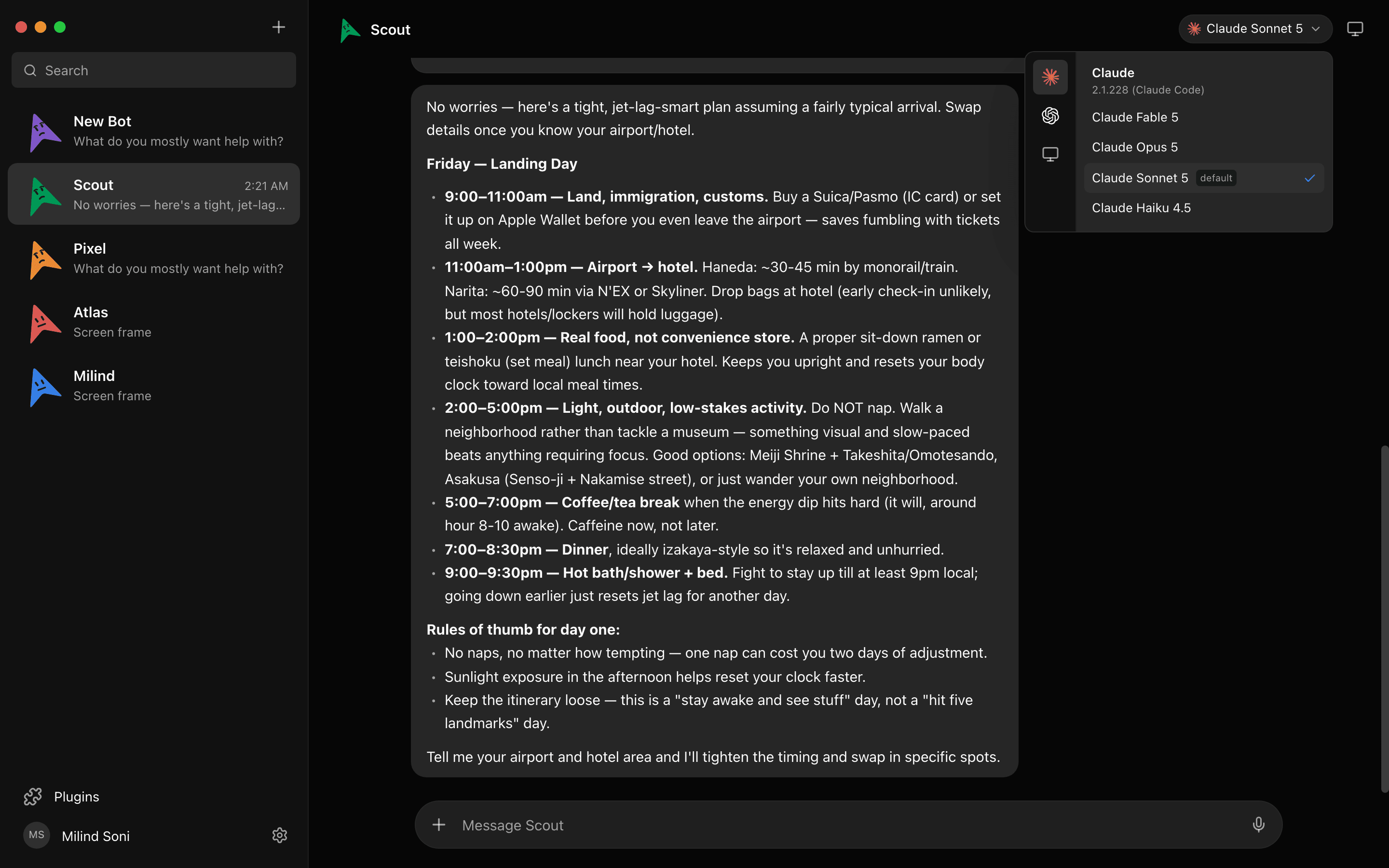
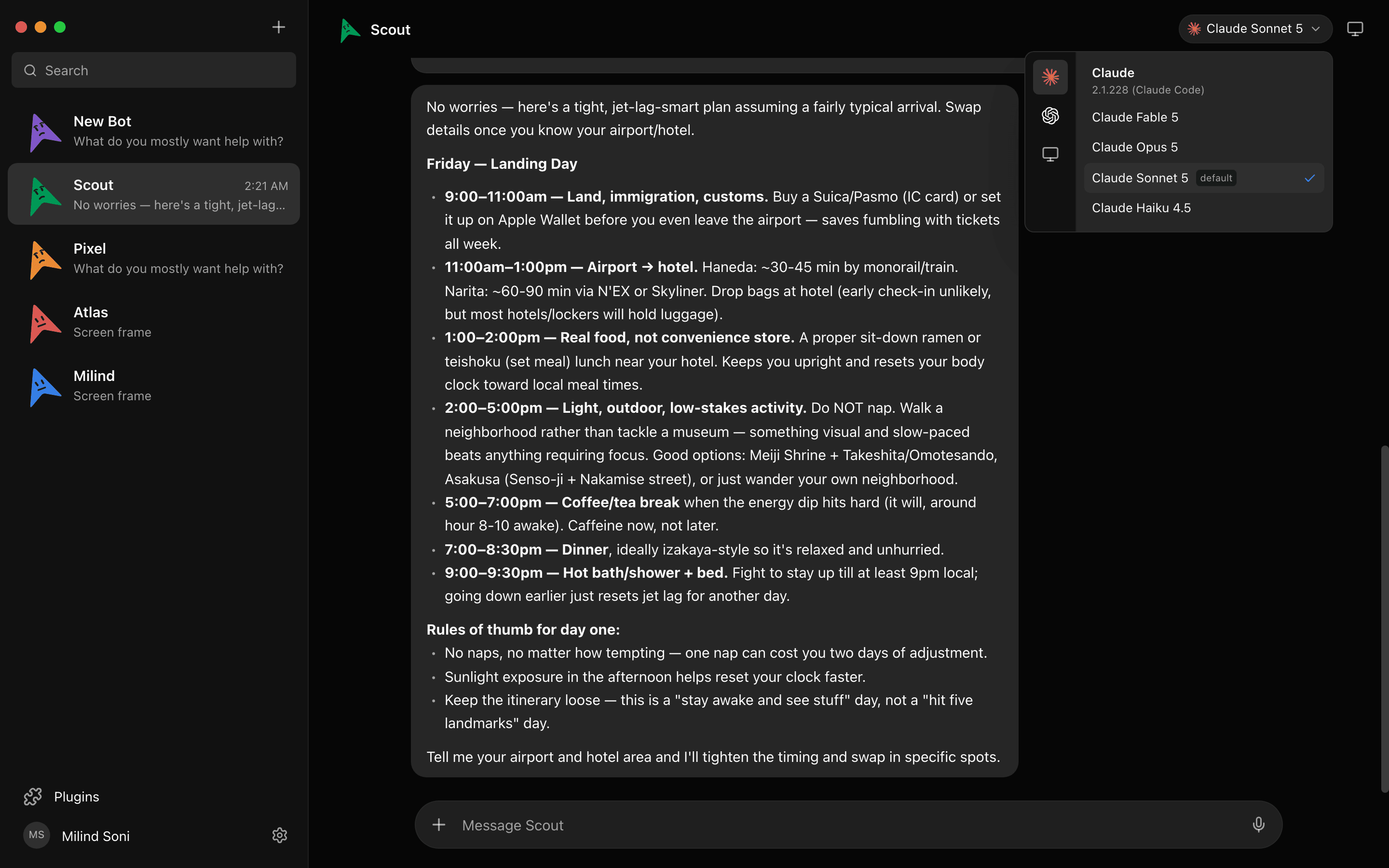
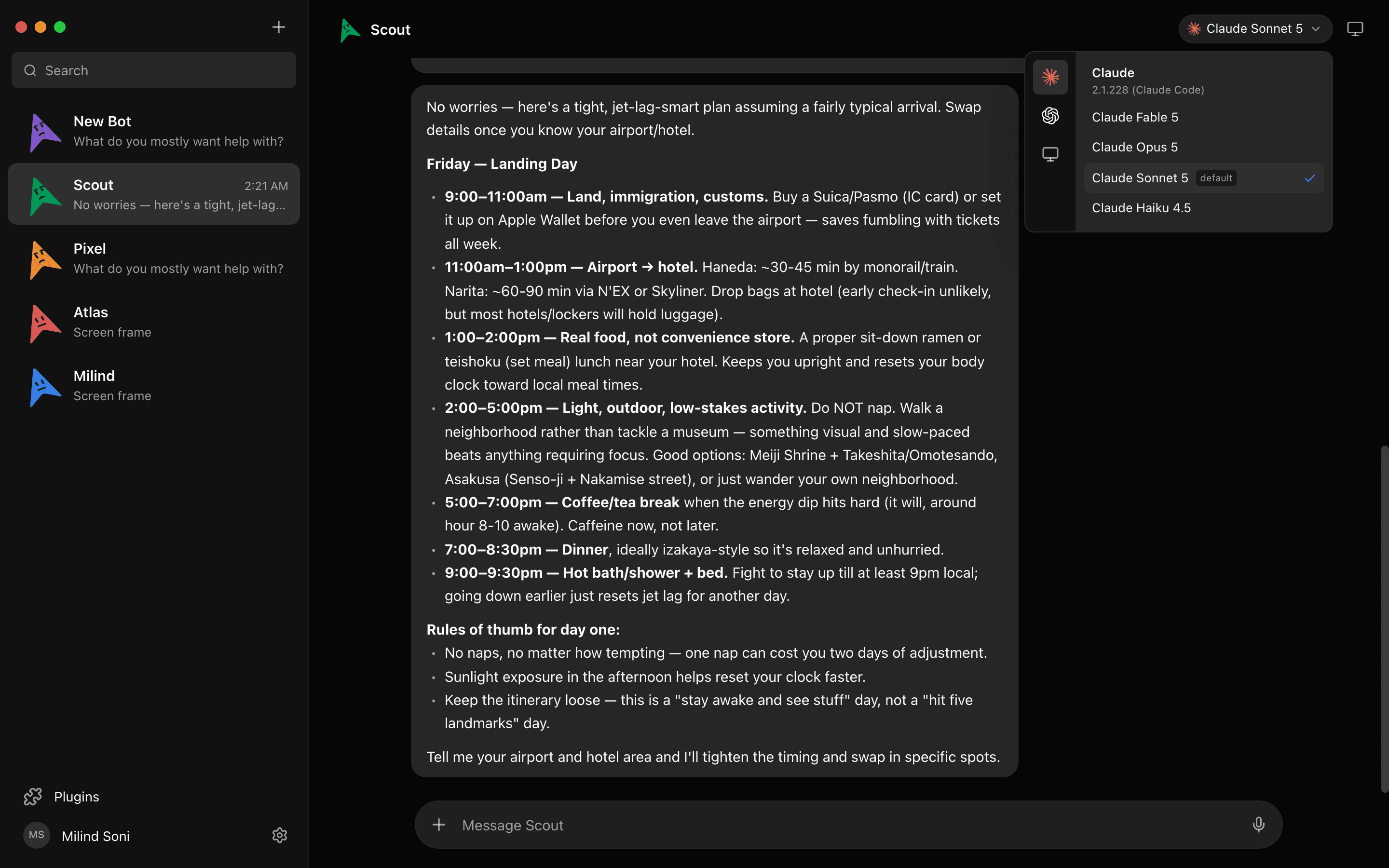
Any model, per bot
Claude, Codex, and Grok sit side by side in a provider rail, with Cursor, Kimi, Droid, Antigravity, OpenCode, and Qwen alongside. Any ACP CLI or OpenAI-compatible endpoint works too, so a local model is one URL away. Give one bot Claude for writing, another a local model for the documents that cannot leave the building, and switch mid-conversation.
Connected apps over OAuth
Cowork's connectors are the feature people miss most in the open-source clones. Maus covers it with 500+ apps over Composio: Gmail, Slack, GitHub, Notion, Linear, and the rest. You approve each app once, every bot can use it, and the scoped tokens stay on your disk. No bot ever sees a password.
It asks before it deletes
Shell commands, file edits, and questions surface as Allow / Deny / answer cards in the chat, before the action runs. That applies on your own machine and on a cloud desktop alike, and every decision is logged. An rm -rf is a card you have to press.
A computer per bot, yours or a cloud one
Open the Computer panel and a cloud desktop spins up for that bot, with a live preview and a take-over button. Or let the bot control the machine it is installed on: macOS, Windows, or Ubuntu 24.04 on Xorg. Cloud VM partners include Orgo and Daytona.

A team, not one session
Put bots in a group room. One answers by default, or all of them, or only the ones you @mention. Bots ask each other questions and hand off work, and a peer-comms approval card decides who may talk to whom. Routines run a bot on a schedule or from a webhook.
Here is a live simulation of four bots working in parallel:
A simulation. Pick a bot, or type to it. The replies are scripted; the real thing runs on your own machine.
What Cowork still does better
Three things. Cowork generates Excel, PowerPoint, Word, and PDF files as a built-in feature; Maus has no document generation feature of its own, so a bot produces a spreadsheet only if the CLI underneath it does. Cowork has a Chrome side panel; Maus does not. And Cowork's cloud sessions keep every task going with the lid closed, while Maus only does that for bots you have put on a cloud computer. If any of those is the job, Cowork is the better tool today.
Other Claude Cowork alternatives
- OpenWork from different-ai (YC) is the closest open-source clone of Cowork: MIT, about 24,000 stars, an Electron app on macOS, Windows, and Linux, built on OpenCode. If you want Cowork's shape with OpenCode's model list, start here.
- Eigent is an Apache 2.0 multi-agent desktop on CAMEL-AI, about 15,000 stars, Node plus Python, with a human in the loop. The pick when the job is a workforce of agents rather than one assistant.
- Kuse Cowork is a Rust take on the same idea. We do not have enough verified detail to compare it line by line, so check its README before deciding.
- OpenClaw is the most-starred self-hosted agent, run from a terminal and reached over WhatsApp, Telegram, and 20+ other channels. Powerful, MIT, and by default it runs shell commands without asking. We covered it in OpenClaw alternative with an approval gate built in.
- Hermes Agent from Nous Research is MIT, Python, about 248,000 stars, with a desktop preview, Codex-style command approval, and 20+ chat gateways. Single-agent only.
Which one should you choose?
Stay on Cowork if you are all in on Claude, you want Office documents generated for you, and a paid plan is fine.
Choose OpenWork if you want the Cowork workflow with open source and OpenCode underneath.
Choose Eigent if the job is a team of agents on one task with a person approving the steps.
Choose Maus if you want more than one model, a local model as an option, an approval card before every command, a bot per job with its own apps and computer, and a desktop app on Mac, Windows, or Ubuntu that costs nothing beyond what you already pay your providers.
Frequently asked questions
- Does Claude Cowork work on Windows?
- Yes, since February 10, 2026. The Windows complaint you still see in older threads is out of date. Cowork now runs on macOS, Windows, Linux beta, the web, iOS, Android, and as a Chrome side panel, and since September 16, 2026 it is part of one unified Claude experience where Claude picks the mode for you.
- Is there a free version of Claude Cowork?
- No. Cowork needs a paid plan: Pro at $20 a month, Max at $100 or $200, or a Team or Enterprise seat. The open-source alternatives here are free; with Maus you pay your model providers, and if you already have a Claude Pro or Max plan the claude CLI login you have is what the bot uses.
- Can I use Claude Cowork with a local model?
- No. Cowork is Claude only, with no bring-your-own-key and no local model option. Maus accepts any OpenAI-compatible endpoint, so a model served locally in the Ollama style can be the engine behind a bot, and a different bot can run on Claude at the same time.
- What is the best open-source Claude Cowork alternative?
- It depends on the job. OpenWork is the closest clone of Cowork's shape. Eigent is the pick for a multi-agent workforce with a human in the loop. Maus is the pick if you want a chat app on Mac, Windows, or Ubuntu with an approval card before every command, more than one model, and 500+ connected apps over OAuth.
- Can I use my Claude subscription in Maus?
- Yes. Maus runs bots on the
claudeCLI installed on your machine with your existing login, so a Pro or Max plan works as is. The same goes forcodexandgrok. Your transcripts and keys stay in~/.mauson your disk, and there is nothing to pay us for the app.
Get started in two minutes
The harness is embedded, so there is nothing else to install. Download for macOS, Windows, or Ubuntu, sign in with the CLIs you already have, and meet your first bot. No card, no waitlist. Or read the source on first. Everything on the features list is free; see pricing for the Pro and Enterprise tiers.